Changing the narrative around being formerly incarcerated.
Changing the narrative around being formerly incarcerated.
Changing the narrative around being formerly incarcerated.
Communicating the nonprofit’s mission more effectively and streamlining website updates to boost community engagement.
Communicating the nonprofit’s mission more effectively and streamlining website updates to boost community engagement.
Communicating the nonprofit’s mission more effectively and streamlining website updates to boost community engagement.
responsive website
responsive website
admin portal
admin portal
client
client

Changing the narrative around being formerly incarcerated.
Communicating the nonprofit’s mission more effectively and streamlining website updates to boost community engagement.
responsive website
admin portal
client
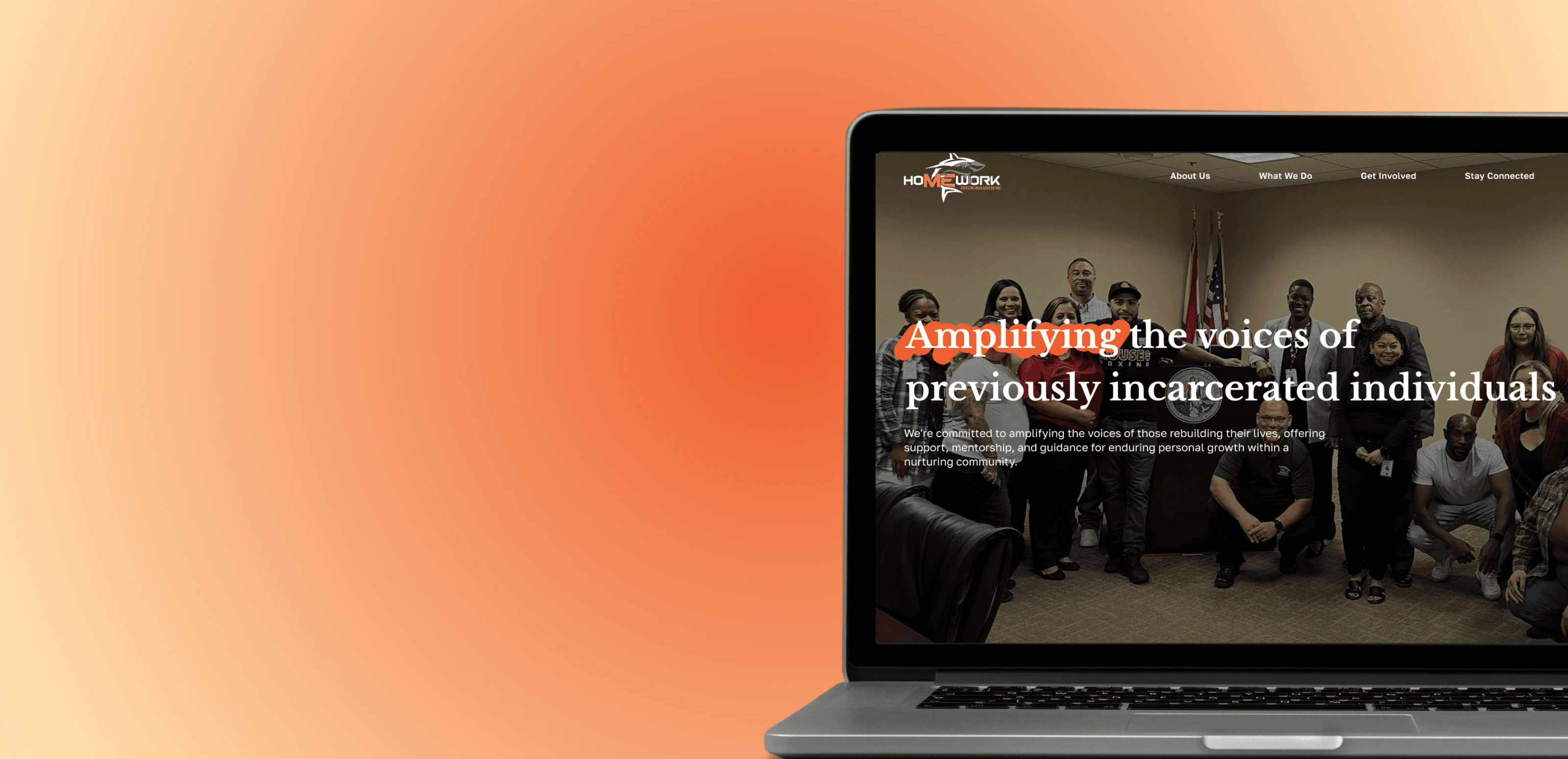
Amplifying the voices of previously incarcerated individuals.
Amplifying the voices of previously incarcerated individuals.
Homework is a nonprofit organization based in San Diego, CA. It provides community outreach for post-incarcerated individuals, with the mission of reducing recidivism and revitalizing communities through civic engagement.
I was a designer on a team of three designers and several developers to implement a desktop platform and admin portal for the NPO. The design process of around nine months served to communicate the nonprofit’s mission more effectively and streamlined website updates to boost community engagement.
Homework is a nonprofit organization based in San Diego, CA. It provides community outreach for post-incarcerated individuals, with the mission of reducing recidivism and revitalizing communities through civic engagement.
I was a designer on a team of three designers and several developers to implement a desktop platform and admin portal for the NPO. The design process of around nine months served to communicate the nonprofit’s mission more effectively and streamlined website updates to boost community engagement.
Homework is a nonprofit organization based in San Diego, CA. It provides community outreach for post-incarcerated individuals, with the mission of reducing recidivism and revitalizing communities through civic engagement.
I was a designer on a team of three designers and several developers to implement a desktop platform and admin portal for the NPO. The design process of around nine months served to communicate the nonprofit’s mission more effectively and streamlined website updates to boost community engagement.
my role
my role
my role
Designer
Designer
Designer
timeline
timeline
timeline
September 2024 to June 2025
September 2024 to June 2025
September 2024 to June 2025
tools and methods
tools and methods
tools and methods
Figma, Pen and Paper, User Research, Usability Audit, Competitive Analysis, Prototyping, User Testing.
Figma, Pen and Paper, User Research, Usability Audit, Competitive Analysis, Prototyping, User Testing.
Figma, Pen and Paper, User Research, Usability Audit, Competitive Analysis, Prototyping, User Testing.
key deliverables
key deliverables
key deliverables
Responsive website and admin portal for internal website edits.
Responsive website and admin portal for internal website edits.
Responsive website and admin portal for internal website edits.
01. defining the problem
01. defining the problem
01. defining the problem
The Problem
The previous website for the NPO was wordy, convoluted, and lacked most of its presented functionality. It was also difficult for admins to maintain website content due to an unfriendly backend system.
Our Solution
To solve these issues, we decided on a two-part deliverable.
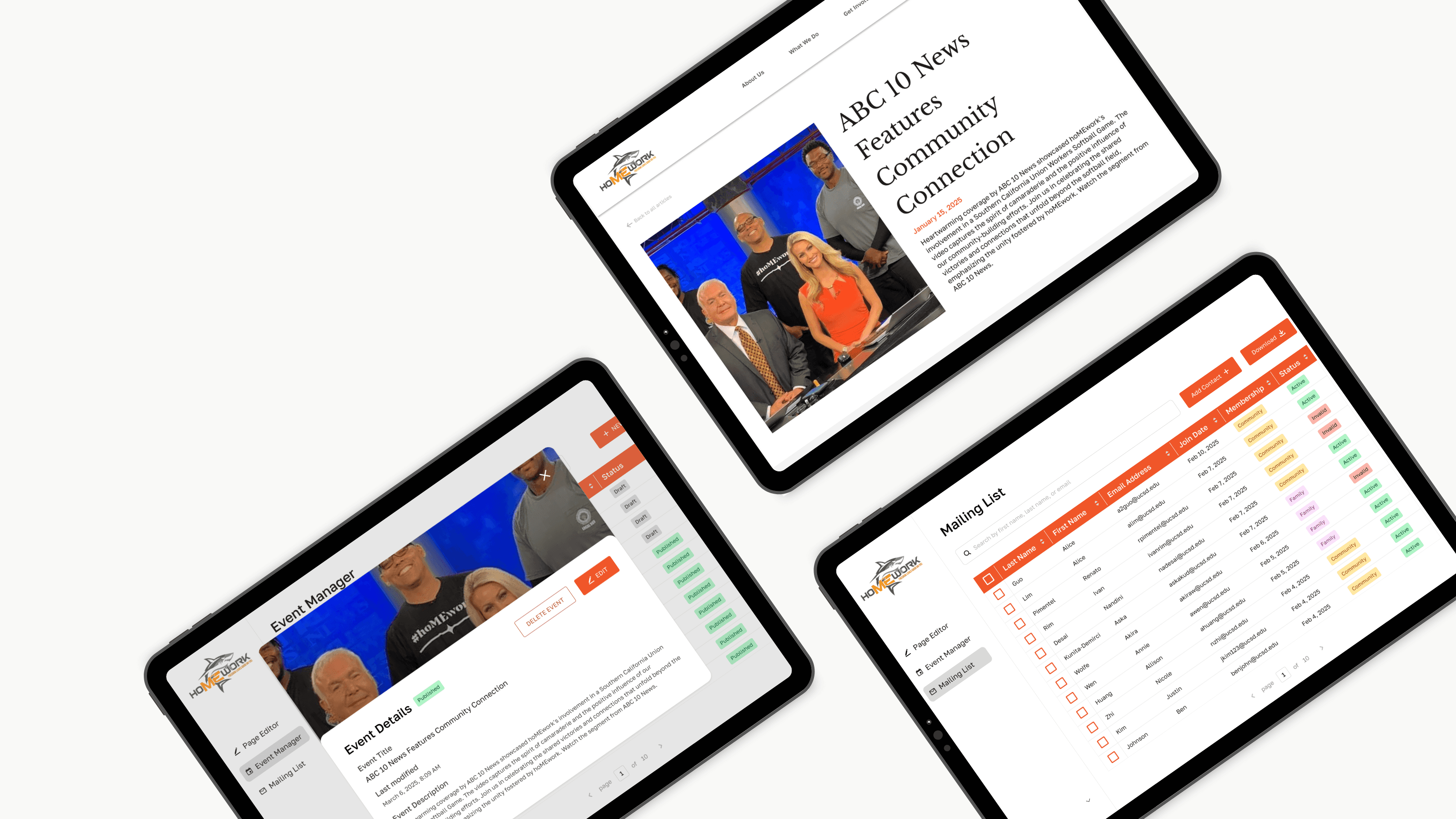
A refreshed, user-friendly front-facing website to help potential new members attend events and engage with its mission.
A tailored admin portal to simplify the process of updating web pages, events, and blog posts for the NPO admins.
The Problem
The previous website for the NPO was wordy, convoluted, and lacked most of its presented functionality. It was also difficult for admins to maintain website content due to an unfriendly backend system.
Our Solution
To solve these issues, we decided on a two-part deliverable.
A refreshed, user-friendly front-facing website to help potential new members attend events and engage with its mission.
A tailored admin portal to simplify the process of updating web pages, events, and blog posts for the NPO admins.
The Problem
The previous website for the NPO was wordy, convoluted, and lacked most of its presented functionality. It was also difficult for admins to maintain website content due to an unfriendly backend system.
Our Solution
To solve these issues, we decided on a two-part deliverable.
A refreshed, user-friendly front-facing website to help potential new members attend events and engage with its mission.
A tailored admin portal to simplify the process of updating web pages, events, and blog posts for the NPO admins.
The Problem
The previous website for the NPO was wordy, convoluted, and lacked most of its presented functionality. It was also difficult for admins to maintain website content due to an unfriendly backend system.
Our Solution
To solve these issues, we decided on a two-part deliverable.
A refreshed, user-friendly front-facing website to help potential new members attend events and engage with its mission.
A tailored admin portal to simplify the process of updating web pages, events, and blog posts for the NPO admins.
02. user research
02. user research
02. user research
Usability Audit
To begin, a preliminary usability audit on the previous Homework website was conducted. Critical issues included:
Poor text hierarchy: There was no clear distinction between header text and paragraph text on web pages, creating convoluted pages.
Inconsistent navigation: Menu buttons linked to both in-page anchors and separate pages, which confused users.
Outdated content: The event calendar and blog pages were out of date due to the complex backend that discouraged regular updates.
Competitive Analysis
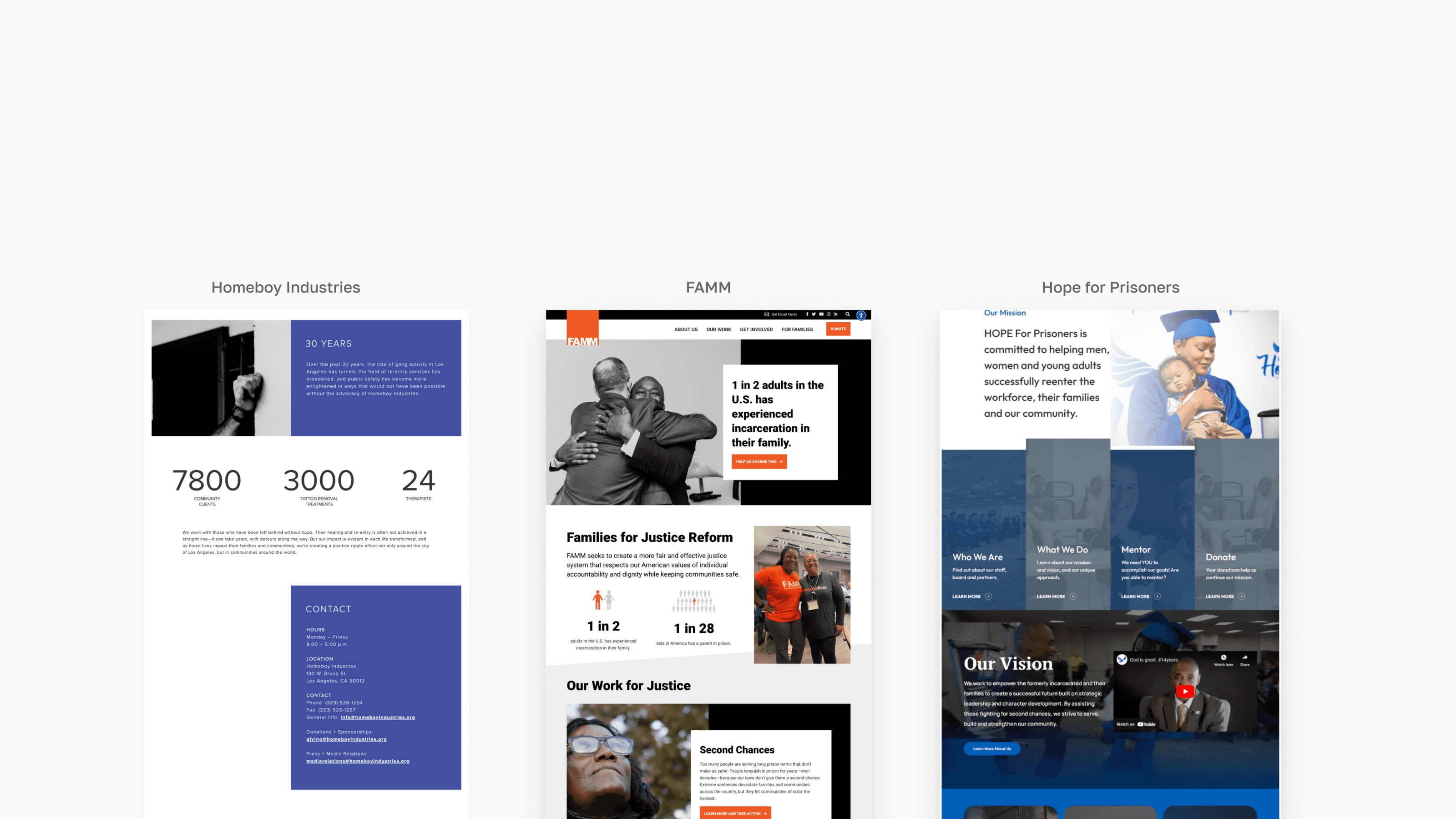
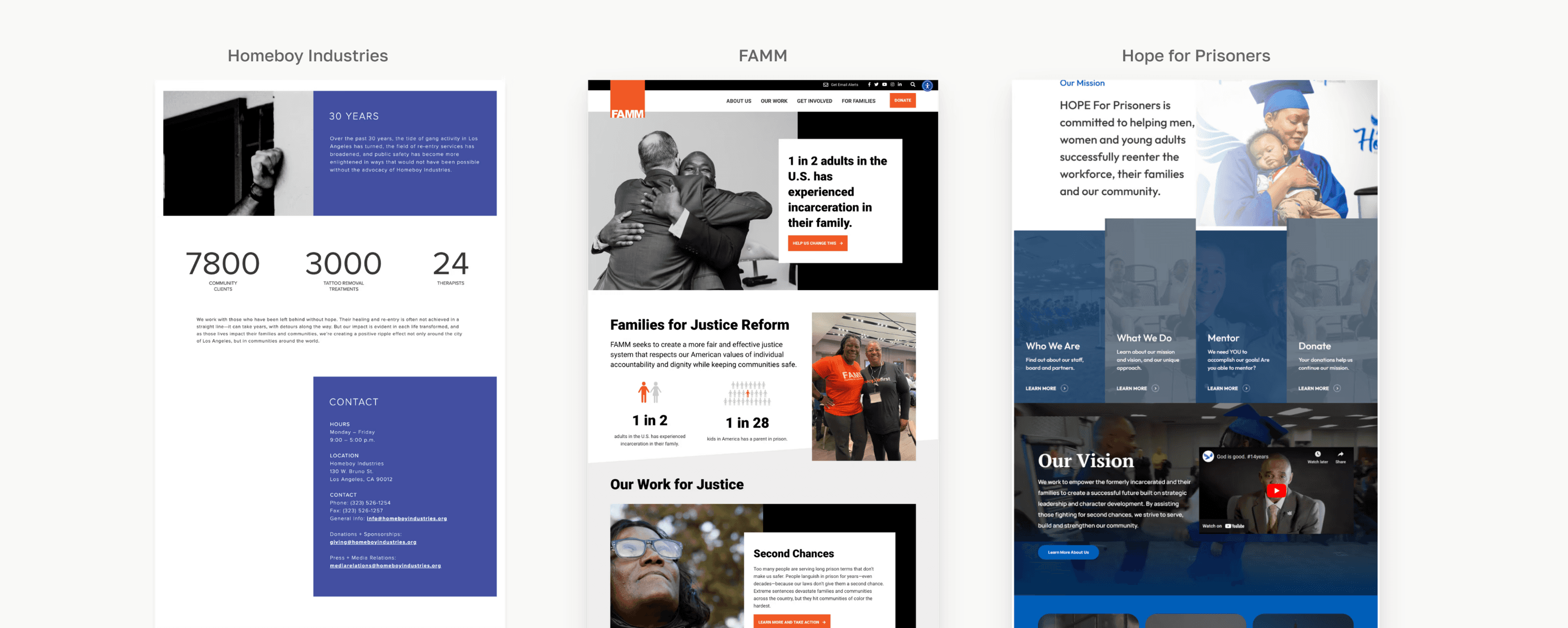
I researched and analyzed other NPO websites with similar missions to identify best practices. These elements included the use of impact metrics and graphics, emphasis on core mission statements, and engaging call to actions.
Usability Audit
To begin, a preliminary usability audit on the previous Homework website was conducted. Critical issues included:
Poor text hierarchy: There was no clear distinction between header text and paragraph text on web pages, creating convoluted pages.
Inconsistent navigation: Menu buttons linked to both in-page anchors and separate pages, which confused users.
Outdated content: The event calendar and blog pages were out of date due to the complex backend that discouraged regular updates.
Competitive Analysis
I researched and analyzed other NPO websites with similar missions to identify best practices. These elements included the use of impact metrics and graphics, emphasis on core mission statements, and engaging call to actions.
Usability Audit
To begin, a preliminary usability audit on the previous Homework website was conducted. Critical issues included:
Poor text hierarchy: There was no clear distinction between header text and paragraph text on web pages, creating convoluted pages.
Inconsistent navigation: Menu buttons linked to both in-page anchors and separate pages, which confused users.
Outdated content: The event calendar and blog pages were out of date due to the complex backend that discouraged regular updates.
Competitive Analysis
I researched and analyzed other NPO websites with similar missions to identify best practices. These elements included the use of impact metrics and graphics, emphasis on core mission statements, and engaging call to actions.
Usability Audit
To begin, a preliminary usability audit on the previous Homework website was conducted. Critical issues included:
Poor text hierarchy: There was no clear distinction between header text and paragraph text on web pages, creating convoluted pages.
Inconsistent navigation: Menu buttons linked to both in-page anchors and separate pages, which confused users.
Outdated content: The event calendar and blog pages were out of date due to the complex backend that discouraged regular updates.
Competitive Analysis
I researched and analyzed other NPO websites with similar missions to identify best practices. These elements included the use of impact metrics and graphics, emphasis on core mission statements, and engaging call to actions.
Feasibility Mapping
We created a feasibility map on Figma to prioritize different client requests into our Minimum Viable Product (MVP), second, and third iterations.
Stakeholder Meetings
Throughout the user research process, we met with stakeholders to ensure our designs aligned with their visions and needs. These meetings continued throughout the entire design process to keep stakeholders informed, showcase progress, and reiterate designs if needed.
Feasibility Mapping
We created a feasibility map on Figma to prioritize different client requests into our Minimum Viable Product (MVP), second, and third iterations.
Stakeholder Meetings
Throughout the user research process, we met with stakeholders to ensure our designs aligned with their visions and needs. These meetings continued throughout the entire design process to keep stakeholders informed, showcase progress, and reiterate designs if needed.
Feasibility Mapping
We created a feasibility map on Figma to prioritize different client requests into our Minimum Viable Product (MVP), second, and third iterations.
Stakeholder Meetings
Throughout the user research process, we met with stakeholders to ensure our designs aligned with their visions and needs. These meetings continued throughout the entire design process to keep stakeholders informed, showcase progress, and reiterate designs if needed.
Feasibility Mapping
We created a feasibility map on Figma to prioritize different client requests into our Minimum Viable Product (MVP), second, and third iterations.
Stakeholder Meetings
Throughout the user research process, we met with stakeholders to ensure our designs aligned with their visions and needs. These meetings continued throughout the entire design process to keep stakeholders informed, showcase progress, and reiterate designs if needed.
03. ideating the product
03. ideating the product
03. ideating the product
style guide
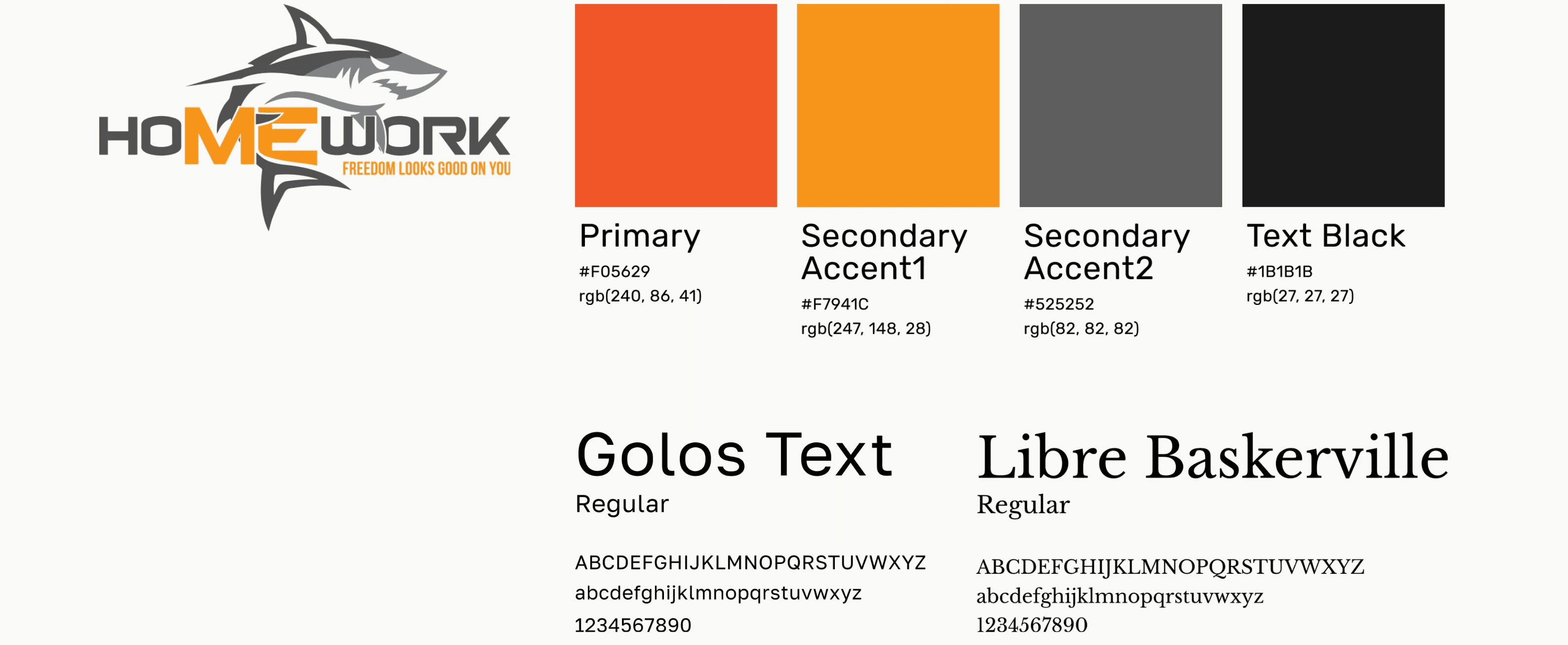
To achieve consistency between designs, we finalized a style guide. The colors and logo were provided by the NPO stakeholders. The typography was chosen to match the NPO’s vision for a professional, trustworthy, and approachable website. Libre Baskerville for headings and Golos Text for paragraph text were selected.
style guide
To achieve consistency between designs, we finalized a style guide. The colors and logo were provided by the NPO stakeholders. The typography was chosen to match the NPO’s vision for a professional, trustworthy, and approachable website. Libre Baskerville for headings and Golos Text for paragraph text were selected.
style guide
To achieve consistency between designs, we finalized a style guide. The colors and logo were provided by the NPO stakeholders. The typography was chosen to match the NPO’s vision for a professional, trustworthy, and approachable website. Libre Baskerville for headings and Golos Text for paragraph text were selected.
style guide
To achieve consistency between designs, we finalized a style guide. The colors and logo were provided by the NPO stakeholders. The typography was chosen to match the NPO’s vision for a professional, trustworthy, and approachable website. Libre Baskerville for headings and Golos Text for paragraph text were selected.
information architecture
We mapped out the information architecture for both the previous website and the newly designed website to further understand key changes and user flows. The new information architecture showcases a simplified flow that is more friendly to navigate. Changes include:
Splitting up original pages and rephrasing page titles for clarity.
Removing the Forum, an inactive page.
Implementing a Contact Form that routes directly to the NPO inbox to increase client outreach.
rapid wireframing
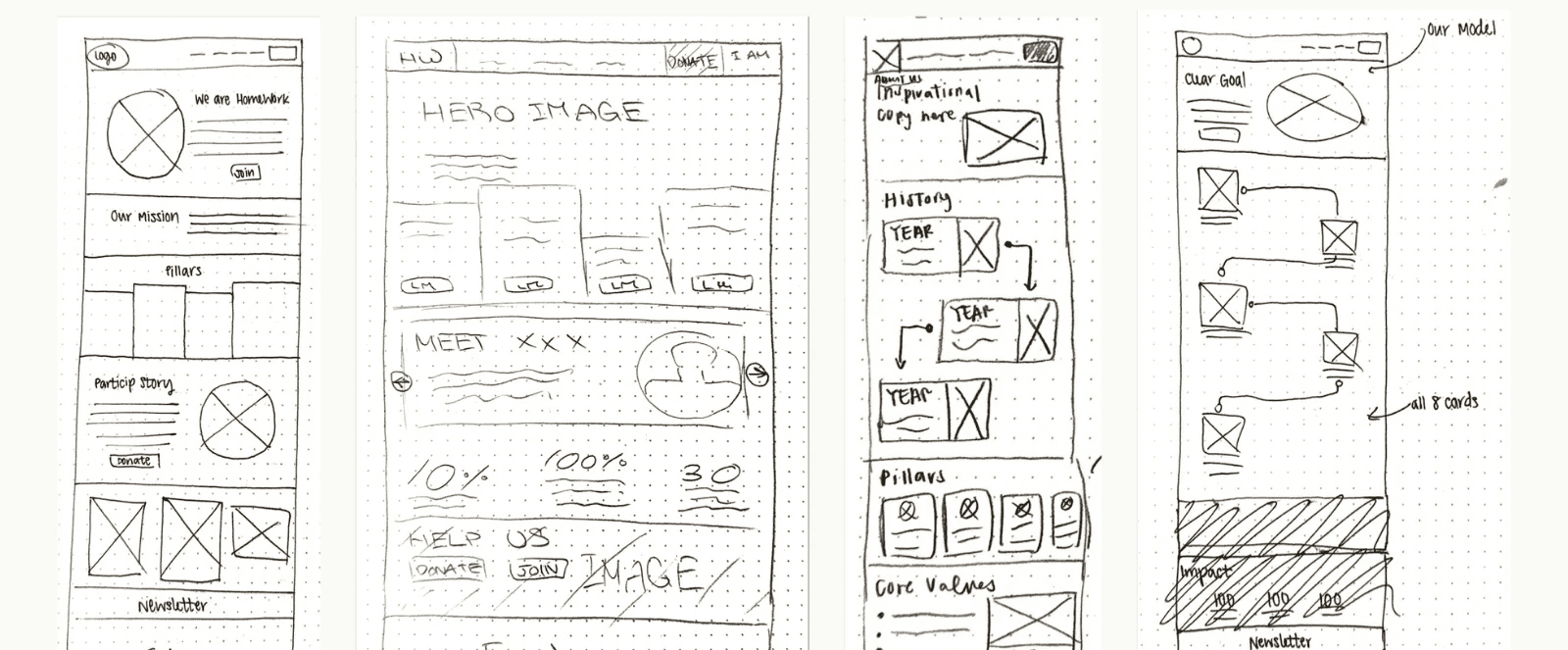
A few weeks into user research, we began ideating using paper and pencil sketches. We used timed brainstorming sessions where designers each had 3-5 minutes to sketch key pages. We then shared our ideas and iterated, taking inspiration from each other. Many features from these sessions made it to final designs!
information architecture
We mapped out the information architecture for both the previous website and the newly designed website to further understand key changes and user flows. The new information architecture showcases a simplified flow that is more friendly to navigate. Changes include:
Splitting up original pages and rephrasing page titles for clarity.
Removing the Forum, an inactive page.
Implementing a Contact Form that routes directly to the NPO inbox to increase client outreach.
rapid wireframing
A few weeks into user research, we began ideating using paper and pencil sketches. We used timed brainstorming sessions where designers each had 3-5 minutes to sketch key pages. We then shared our ideas and iterated, taking inspiration from each other. Many features from these sessions made it to final designs!
information architecture
We mapped out the information architecture for both the previous website and the newly designed website to further understand key changes and user flows. The new information architecture showcases a simplified flow that is more friendly to navigate. Changes include:
Splitting up original pages and rephrasing page titles for clarity.
Removing the Forum, an inactive page.
Implementing a Contact Form that routes directly to the NPO inbox to increase client outreach.
rapid wireframing
A few weeks into user research, we began ideating using paper and pencil sketches. We used timed brainstorming sessions where designers each had 3-5 minutes to sketch key pages. We then shared our ideas and iterated, taking inspiration from each other. Many features from these sessions made it to final designs!
information architecture
We mapped out the information architecture for both the previous website and the newly designed website to further understand key changes and user flows. The new information architecture showcases a simplified flow that is more friendly to navigate. Changes include:
Splitting up original pages and rephrasing page titles for clarity.
Removing the Forum, an inactive page.
Implementing a Contact Form that routes directly to the NPO inbox to increase client outreach.
rapid wireframing
A few weeks into user research, we began ideating using paper and pencil sketches. We used timed brainstorming sessions where designers each had 3-5 minutes to sketch key pages. We then shared our ideas and iterated, taking inspiration from each other. Many features from these sessions made it to final designs!
low-fidelity designs
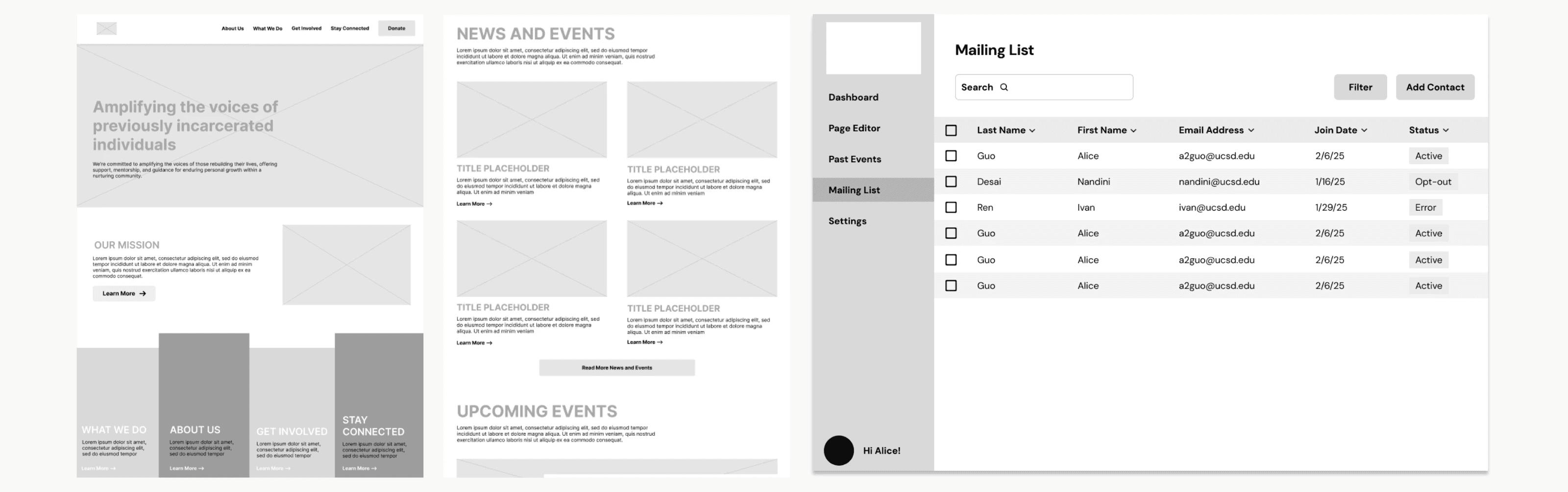
Low-fidelity designs were created on Figma to test out our ideas. Multiple lo-fis were often created for one page, allowing us to see the info structure and explore how visual elements fit together.
low-fidelity designs
Low-fidelity designs were created on Figma to test out our ideas. Multiple lo-fis were often created for one page, allowing us to see the info structure and explore how visual elements fit together.
low-fidelity designs
Low-fidelity designs were created on Figma to test out our ideas. Multiple lo-fis were often created for one page, allowing us to see the info structure and explore how visual elements fit together.
low-fidelity designs
Low-fidelity designs were created on Figma to test out our ideas. Multiple lo-fis were often created for one page, allowing us to see the info structure and explore how visual elements fit together.
03. building the prototype
04. building the prototype
03. building the prototype
user testing
After creating initial high-fidelity prototypes and user flows, we conducted usability tests with 24 users. Tasks included:
Navigate through the external-facing website and identify any areas causing confusion.
Using the mailing list in the admin portal, add a contact. Then, filter the existing contacts by status.
Using the page editor in the admin portal, add a testimonial on the homepage and save edits.
iterating
These simple tasks provided us with valuable feedback to gauge whether our designs were intuitive, functional, and effective. We made many iterations based on the feedback, with an example being the mailing list filtering function. Users expected it to hide non-matching results rather than highlight them. Based on this feedback, I redesigned the filtering interaction to work through table headers, which improved both clarity and usability.
user testing
After creating initial high-fidelity prototypes and user flows, we conducted usability tests with 24 users. Tasks included:
Navigate through the external-facing website and identify any areas causing confusion.
Using the mailing list in the admin portal, add a contact. Then, filter the existing contacts by status.
Using the page editor in the admin portal, add a testimonial on the homepage and save edits.
iterating
These simple tasks provided us with valuable feedback to gauge whether our designs were intuitive, functional, and effective. We made many iterations based on the feedback, with an example being the mailing list filtering function. Users expected it to hide non-matching results rather than highlight them. Based on this feedback, I redesigned the filtering interaction to work through table headers, which improved both clarity and usability.
user testing
After creating initial high-fidelity prototypes and user flows, we conducted usability tests with 24 users. Tasks included:
Navigate through the external-facing website and identify any areas causing confusion.
Using the mailing list in the admin portal, add a contact. Then, filter the existing contacts by status.
Using the page editor in the admin portal, add a testimonial on the homepage and save edits.
iterating
These simple tasks provided us with valuable feedback to gauge whether our designs were intuitive, functional, and effective. We made many iterations based on the feedback, with an example being the mailing list filtering function. Users expected it to hide non-matching results rather than highlight them. Based on this feedback, I redesigned the filtering interaction to work through table headers, which improved both clarity and usability.
user testing
After creating initial high-fidelity prototypes and user flows, we conducted usability tests with 24 users. Tasks included:
Navigate through the external-facing website and identify any areas causing confusion.
Using the mailing list in the admin portal, add a contact. Then, filter the existing contacts by status.
Using the page editor in the admin portal, add a testimonial on the homepage and save edits.
iterating
These simple tasks provided us with valuable feedback to gauge whether our designs were intuitive, functional, and effective. We made many iterations based on the feedback, with an example being the mailing list filtering function. Users expected it to hide non-matching results rather than highlight them. Based on this feedback, I redesigned the filtering interaction to work through table headers, which improved both clarity and usability.
final prototypes
Once layouts were finalized, we used Figma to produce high-fidelity prototypes that represented what the final website and admin portal designs should look like in terms of colors, user interface, and interactions. These were presented to both clients and developers.
Explore the interactive prototype for the website below!
final prototypes
Once layouts were finalized, we used Figma to produce high-fidelity prototypes that represented what the final website and admin portal designs should look like in terms of colors, user interface, and interactions. These were presented to both clients and developers.
Explore the interactive prototype for the website below!
final prototypes
Once layouts were finalized, we used Figma to produce high-fidelity prototypes that represented what the final website and admin portal designs should look like in terms of colors, user interface, and interactions. These were presented to both clients and developers.
Explore the interactive prototype for the website below!
final prototypes
Once layouts were finalized, we used Figma to produce high-fidelity prototypes that represented what the final website and admin portal designs should look like in terms of colors, user interface, and interactions. These were presented to both clients and developers.
Explore the interactive prototype for the website below!
04. final thoughts
05. final thoughts
04. final thoughts
key outcomes
The final prototype provided a clean, mission-forward public site and a much more intuitive backend for NPO staff.
next steps and impact
This project is currently under development and scheduled to finish in the summer of 2025! Once launched, I plan to track increases in site engagement (e.g., time on page, event signups) and reductions in time spent by staff on website maintenance tasks in order to gauge impact.
reflections
This project has allowed me so many opportunities to grow as a designer. The thorough design process helped me become more confident using Figma for large-scale design systems. This project was also the first time I had a chance to collaborate with multiple developers, and I learned how to effectively communicate my ideas to a larger team. Because I needed to both acknowledge technical constraints and defend my designs to developers, my design decisions needed to be backed up with research. Through user testing. I also learned to let real feedback shape the final product and put users first.
Looking back on the product, I’m proud of the result, but I also recognize areas for future growth — particularly in grounding the admin portal design in deeper research and pushing the visual polish of the site even further. I would love to one day iterate on these designs and further refine them.
This project was completed with a talented team of designers and developers. While my focus was on research, UX strategy, and visual design, collaboration was key to our success.
key outcomes
The final prototype provided a clean, mission-forward public site and a much more intuitive backend for NPO staff.
next steps and impact
This project is currently under development and scheduled to finish in the summer of 2025! Once launched, I plan to track increases in site engagement (e.g., time on page, event signups) and reductions in time spent by staff on website maintenance tasks in order to gauge impact.
reflections
This project has allowed me so many opportunities to grow as a designer. The thorough design process helped me become more confident using Figma for large-scale design systems. This project was also the first time I had a chance to collaborate with multiple developers, and I learned how to effectively communicate my ideas to a larger team. Because I needed to both acknowledge technical constraints and defend my designs to developers, my design decisions needed to be backed up with research. Through user testing. I also learned to let real feedback shape the final product and put users first.
Looking back on the product, I’m proud of the result, but I also recognize areas for future growth — particularly in grounding the admin portal design in deeper research and pushing the visual polish of the site even further. I would love to one day iterate on these designs and further refine them.
This project was completed with a talented team of designers and developers. While my focus was on research, UX strategy, and visual design, collaboration was key to our success.
key outcomes
The final prototype provided a clean, mission-forward public site and a much more intuitive backend for NPO staff.
next steps and impact
This project is currently under development and scheduled to finish in the summer of 2025! Once launched, I plan to track increases in site engagement (e.g., time on page, event signups) and reductions in time spent by staff on website maintenance tasks in order to gauge impact.
reflections
This project has allowed me so many opportunities to grow as a designer. The thorough design process helped me become more confident using Figma for large-scale design systems. This project was also the first time I had a chance to collaborate with multiple developers, and I learned how to effectively communicate my ideas to a larger team. Because I needed to both acknowledge technical constraints and defend my designs to developers, my design decisions needed to be backed up with research. Through user testing. I also learned to let real feedback shape the final product and put users first.
Looking back on the product, I’m proud of the result, but I also recognize areas for future growth — particularly in grounding the admin portal design in deeper research and pushing the visual polish of the site even further. I would love to one day iterate on these designs and further refine them.
This project was completed with a talented team of designers and developers. While my focus was on research, UX strategy, and visual design, collaboration was key to our success.
key outcomes
The final prototype provided a clean, mission-forward public site and a much more intuitive backend for NPO staff.
next steps and impact
This project is currently under development and scheduled to finish in the summer of 2025! Once launched, I plan to track increases in site engagement (e.g., time on page, event signups) and reductions in time spent by staff on website maintenance tasks in order to gauge impact.
reflections
This project has allowed me so many opportunities to grow as a designer. The thorough design process helped me become more confident using Figma for large-scale design systems. This project was also the first time I had a chance to collaborate with multiple developers, and I learned how to effectively communicate my ideas to a larger team. Because I needed to both acknowledge technical constraints and defend my designs to developers, my design decisions needed to be backed up with research. Through user testing. I also learned to let real feedback shape the final product and put users first.
Looking back on the product, I’m proud of the result, but I also recognize areas for future growth — particularly in grounding the admin portal design in deeper research and pushing the visual polish of the site even further. I would love to one day iterate on these designs and further refine them.
This project was completed with a talented team of designers and developers. While my focus was on research, UX strategy, and visual design, collaboration was key to our success.
the team!
the team!
Nandini Desai
Ivan Rim
Alice Guo
Michael Sullivan
Nandini Desai
Ivan Rim
Alice Guo
Michael Sullivan
Nandini Desai
Ivan Rim
Alice Guo
Michael Sullivan
Vinayak Sharma
Edward Lin
Karen Yan
Kevin Do
Kile Hsu
Numaan Formoli
Weston Zong
Yunshan Li
Nandini Desai
Ivan Rim
Alice Guo
Michael Sullivan
the team
Vinayak Sharma
Edward Lin
Karen Yan
Kevin Do
Vinayak Sharma
Edward Lin
Karen Yan
Kevin Do
Vinayak Sharma
Edward Lin
Karen Yan
Kevin Do
the team
Kile Hsu
Numaan Formoli
Weston Zong
Yunshan Li
Kile Hsu
Numaan Formoli
Weston Zong
Yunshan Li
Kile Hsu
Numaan Formoli
Weston Zong
Yunshan Li